Implementation
Sales Hub implementation checklist, block by block
Everything that should be configured and tested before your sales team starts working in Sales Hub, in the order it makes sense to build it.
This Sales Hub implementation checklist covers what needs to be configured and tested before the sales team starts working in HubSpot: account and users, data, pipelines, sales activity, automation and reporting. Use it to plan from scratch or to review a portal that is already live but never quite works.
It is ordered the way it makes sense to build, because each block depends on the previous one: there is no point building dashboards if the pipeline stages are still going to change.
- 01Account and users
- 02Data and properties
- 03Pipelines
- 04Sales activity
- 05Automation
- 06Reporting
Before touching the portal: decisions made
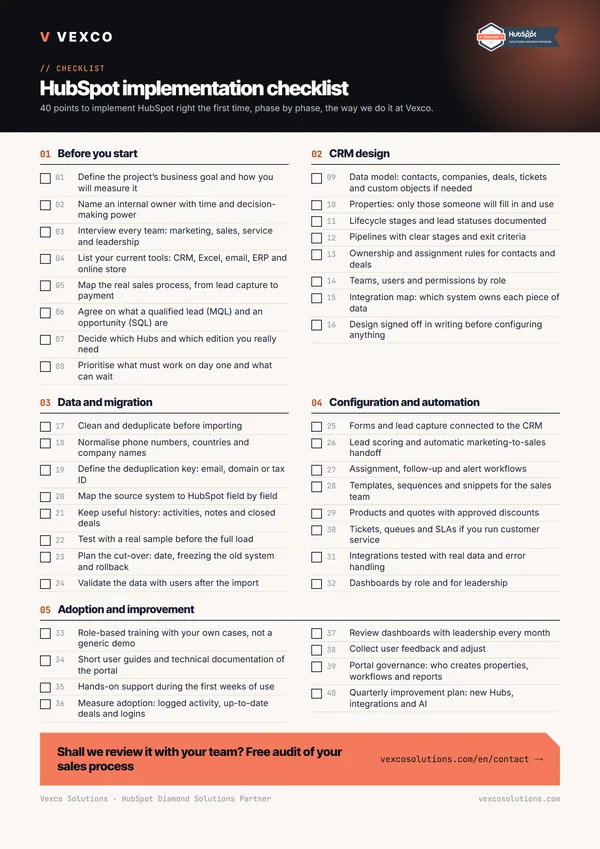
- A written definition of lead, opportunity and customer in your company.
- Who owns an account and what happens to their records when a sales rep leaves.
- How many business lines, countries or types of sale need a pipeline of their own.
- What information leadership needs each week and in what format it gets it today.
- Which tools need to connect to HubSpot: ERP, invoicing, e-signature, telephony.
- Which Sales Hub edition you have or are going to buy, and how many paid seats.
The edition matters because it shapes the architecture. According to HubSpot's documentation, teams and pipeline rules require Professional or Enterprise, and permission sets and property access restrictions require Enterprise. If you are torn between editions, we go into detail in Starter, Professional or Enterprise.
Account, users and teams
- Email sending domain connected and verified for sending from HubSpot.
- Each rep's inbox and calendar connected, with email logging switched on.
- Users created with the right seat and no surplus super admins: two is usually enough.
- Teams by business line or region, if your edition includes them.
- Permissions by object: which deals each rep sees and edits (all, their team's or only their own).
- Export and bulk delete restricted to the people who genuinely need them.
- Company currency and, if you sell in several, additional currencies with their exchange rates.
- Time zone, date format and business hours reviewed.
Getting teams and permissions right deserves its own design session: decide visibility by team first, then grant exceptions, never the other way round.
Data and properties
- A closed list of custom properties for contacts, companies and deals, with internal name, type and description.
- Dropdowns rather than free text for anything you will filter or report on: industry, source, lost reason.
- Your own property groups so each role can find what matters to them.
- Record page and preview sidebar configured per object, showing only what is used.
- Lifecycle stages defined, with the event that changes each one.
- Lead status values agreed with whoever prospects, or a leads pipeline if you use the Leads object.
- A test import with a sample and then the final import, deduplicated by email and domain.
- Automatic contact-to-company association by domain switched on or off deliberately.
- The correct owner on every imported record.
Pipelines and deals
- Stages that reflect customer commitments, not the rep's internal tasks.
- Written exit criteria for each stage.
- Probability per stage reviewed against historical data, if you have it.
- Properties required when a deal moves into certain stages: amount, close date, decision-maker.
- Lost reason mandatory, as a dropdown, when a deal is closed lost.
- Pipeline rules to prevent skipping stages or moving backwards where that makes sense.
- A fixed naming convention for deals, for example company plus product.
- Products in the library with SKU, price and, where relevant, billing frequency.
- A quote template with your branding, terms and tax details.
Designing the stages well is what shows most in day-to-day work; we explain it in depth in how to design sales pipelines in HubSpot.
Sales activity
- Custom call outcomes: connected, left voicemail, not interested, call back.
- Task types and task queues for prospecting and follow-up.
- Email templates and snippets for the most common replies.
- Sequences for following up inbound leads and for reviving cold opportunities.
- Meeting links per rep and, if you share meetings in rotation, per team.
- Playbooks with the qualification questions the team uses.
- Mobile app installed and tested by anyone who works away from the office.
Automation
- Automatic assignment of new leads by region, product or rotation, with a task for the owner.
- An alert when a deal has spent too many days in a stage without activity.
- Tasks created on entering specific stages: send proposal, prepare contract.
- Lifecycle sync with deals reviewed: to opportunity when the deal is created, to customer when it is won.
- A notification to finance, or invoice creation in the ERP, when a deal is won, if there is an integration.
- Workflows with names that follow a convention, a description and a folder per area.
Every automation should have an owner. A workflow nobody remembers creating is the most common cause of the classic "HubSpot changed this value on its own".
Reporting and forecasting
- Sales rep dashboard: their open deals, overdue tasks and activity for the week.
- Sales manager dashboard: pipeline by stage and by rep, stalled deals, win rate.
- Leadership dashboard with few indicators and filters by team and period.
- Sales goals loaded per rep or per team.
- The forecasting tool with the categories the team uses, in the editions that include it.
- A lost reasons report by stage and by rep.
- Pipelines
- Quotes
- Sequences
- Tasks and calls
- Forecasting
- Dashboards
Documentation that should be written down
This is the part that gets postponed most and missed most six months later, when a new rep joins or the CRM administrator changes:
- Data model: objects, associations and custom properties with what they mean.
- Definition of each pipeline and lifecycle stage, with its exit criteria.
- Workflow inventory: what each one does, what triggers it and who owns it.
- A matrix of roles, teams and permissions, and the procedure for adding and removing users.
- Active integrations: what they sync, in which direction and who to alert if they fail.
You do not need a hundred-page manual. A shared, living document that the administrator updates every time something changes answers most questions.
Go-live: the final week
- Acceptance testing with two or three reps on real deals.
- Role-based training with your data, not a demo account.
- A one-page guide: how to create a deal, what to fill in at each stage, how to log a call.
- A cut-off date communicated: from that day on, if it is not in HubSpot, it does not exist.
- Old spreadsheets archived as read-only.
- A usage review at 15 and 30 days.
That line about "if it is not in HubSpot, it does not exist" has to come from leadership, not the consultant. Without it, the CRM lives alongside parallel spreadsheets for months.
Mistakes we see when reviewing Sales Hub portals
When we are called in to review an implementation that is not working, the same faults keep coming up: pipelines with a dozen stages nobody can tell apart, free-text properties that are impossible to group in a report, every user set up as a super admin and active sequences with nobody checking the replies. None is serious on its own; together they make the team stop trusting what it sees on screen.
At Vexco we use this checklist in the audit phase of every HubSpot implementation project, and we extend it when there is a migration from another CRM or integrations with invoicing or the ERP.