Implementation
A plan to implement HubSpot in 8 weeks, sprint by sprint
The week-by-week schedule for rolling out Sales Hub or Marketing Hub in 8 weeks: deliverables, the decisions that fall to you and what makes a project run longer.
Implementing HubSpot in 8 weeks is realistic when we are talking about Sales Hub or Marketing Hub, a sales process that is more or less defined and no huge migration behind it. The plan is split into four phases (audit, architecture, build and adoption) that move forward in weekly sprints, each ending with a demo.
Below is the schedule we follow, what gets delivered each week, what your company needs to decide and the signs that the project will need more time.
Is it possible to implement HubSpot in 8 weeks?
Yes, with conditions. Eight weeks works when the scope is one or two hubs, the starting data fits into a handful of exports (a previous CRM, a few spreadsheets, the customer list from the ERP) and someone in your company has the authority to close decisions within a couple of days. Many Sales Hub or Marketing Hub implementations are even wrapped up sooner, in 4 to 6 weeks.
What stretches the schedule is almost never the configuration. It is migrating history with activities and attachments, integrations with the ERP or invoicing system, several business lines with different processes and, above all, decisions that are left open. Projects with those ingredients take 10 to 14 weeks, and it is worth knowing that from day one.
- Weeks 1-2Audit
- Weeks 3-4Architecture
- Weeks 5-7Build
- Week 8Adoption
Weeks 1 and 2: auditing the process and the data
The first week is all interviews. We speak separately with leadership, sales, marketing, service and finance, because each team describes the process differently and those contradictions are exactly what needs resolving. Typical questions: what turns a contact into an opportunity, who approves a discount, when is a customer considered lost.
In parallel we review the data: exports from the previous CRM, spreadsheets, the customer base in the ERP. We measure duplicates, empty fields, phone and country formats, and how much of the history deserves to come across. If you already have HubSpot, we also audit the portal: unused properties, active workflows nobody remembers creating, pipelines with ghost stages.
Week 2 deliverable: a prioritised report covering what HubSpot must do from day one, what can wait for a second phase and what is not worth doing.
Weeks 3 and 4: CRM architecture
This is where almost everything that will keep the CRM working a year from now gets decided. The architecture document covers:
- Data model: which objects are used (contacts, companies, deals, tickets, leads and, where needed, custom objects) and how they are associated, with association labels when a contact plays different roles.
- Properties: a closed list with internal name, field type, allowed values and who fills each one in.
- Lifecycle stage and lead status: what each stage means in your company and which event changes it.
- Pipelines: stages with exit criteria, probability and the properties required at each step.
- Users, teams and permissions: who sees what and who can edit what.
- Automation and reporting: a list of workflows with their triggers and the dashboards each role needs.
You sign it off in writing before anything is built. Changing a stage in a document takes five minutes; changing it with hundreds of deals in it and three workflows hanging off it takes considerably longer.
Appoint an internal project owner before week 3. Architecture decisions (what a qualified lead is, how many pipelines, who owns each account) cannot be made for you by the partner, and every week a decision stays open gets added to the end of the schedule.
Weeks 5 to 7: building in sprints
The build goes block by block, and every week you see and test what has been built with real data, not a generic demo. A typical split:
- Sprint 5: properties, pipelines, pipeline rules, users and teams. A first test import with a sample of the data.
- Sprint 6: the full, deduplicated import, assignment and follow-up workflows, email templates, products and quotes. If marketing is in scope: forms, lists and lead scoring.
- Sprint 7: dashboards by role, leadership reports, adjustments coming out of the demos and acceptance testing with key users.
The order matters. Reports are built last because they depend on properties and stages no longer changing. And imports are done twice, once as a test and once for real, because the test always uncovers something: dates in the wrong format, owners who have left the company, companies with no website domain.
Week 8: adoption and go-live
Week 8 is the one that decides whether the project was worth it. Training is done by role and with your own deals: sales reps learn to move their opportunities and log calls, marketing learns to read where its leads come from, leadership learns to filter its dashboard. A generic two-hour session for the whole company achieves very little.
After go-live, the job is to support people. In the first few days small questions come up that, if nobody answers them, turn into "I will note it in my spreadsheet and add it later". We review real usage (deals with no activity, overdue tasks, empty required properties) and adjust whatever does not fit the way people actually work.
Before
- Every rep with their own spreadsheet
- Forecast built by hand on Monday
- Web leads in a shared inbox
After
- One pipeline with exit criteria
- Forecast straight from the CRM
- Leads assigned with an automatic task
What we need from your company during the 8 weeks
The schedule holds when both sides do their part. On your side:
- A project owner with decision-making authority and a few hours a week to give it.
- Super admin access to HubSpot and to any tools that need reviewing.
- Data exports in week 1 or 2, not week 6.
- An hour from each team for the interviews and another to validate the demo of their part.
- Key users available for testing in week 7.
On ours, at Vexco the same senior team that runs the audit configures the portal and, if needed, develops the integrations, so there are no handovers between consultants and developers halfway through the project.
Signs your project will need more than 8 weeks
Better to spot them in the audit than in week 6:
- Migration with full history: emails, calls, notes and attachments from another CRM. This is planned as a block of its own; we explain it in CRM migration to HubSpot.
- Integrations with an ERP, invoicing or online shop: syncing orders, invoices or payments requires its own design, development and testing. See what it involves in HubSpot integrations.
- Several business units or countries with different processes, separate teams and permissions by team.
- Custom objects that have to be designed from scratch.
- Very dirty data, with mass duplicates or no common identifier between systems.
None of these is a problem if it is planned for. A project with a migration from Odoo and tens of thousands of invoices, like the one we did for an accounting firm, does not fit into 8 weeks, and that is fine: it is split into phases and the team starts working in HubSpot before the migration is finished.
How to tell whether the implementation has worked
A month after go-live you should be able to answer yes to these questions. Do sales reps update their deals without anyone reminding them? Does leadership check the dashboard instead of asking for a spreadsheet? Do new leads get an owner and a task in under a day? Are the required properties filled in with data that makes sense?
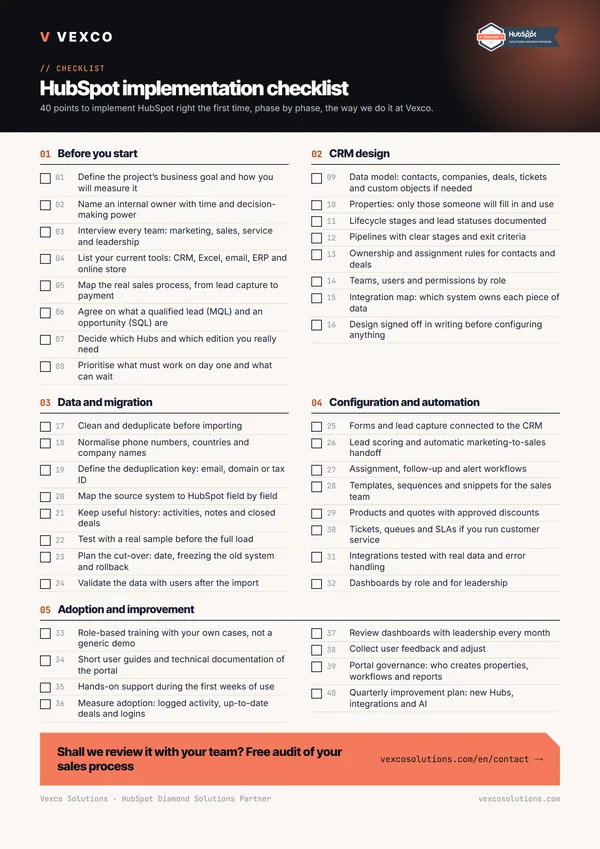
If any answer is no, the problem usually lies in adoption rather than configuration. Role-based training is the usual fix and, if you are starting with sales, the Sales Hub implementation checklist goes into more detail. To estimate the budget, see how much it costs to implement HubSpot.