Implementation
How much does it cost to implement HubSpot? What drives the budget
There is no single figure, but there are clear line items. We explain what makes a HubSpot implementation more expensive, what keeps it lean and how to get comparable quotes.
The cost of implementing HubSpot is the sum of three things: the licences you pay monthly or annually, the setup project (configuration, migration, integrations and training) and the hours your own team spends defining and testing. There is no standard figure, because two companies with the same number of users can need very different projects.
What you can know before asking for quotes is which line items make them up and what makes each one grow. That is what we cover here, without specific prices: HubSpot's change often and service fees depend on scope.
The line items in a HubSpot project
- Licences
- Mandatory onboarding
- Design and configuration
- Data migration
- Integrations
- Training
- Ongoing support
Licences are a recurring cost; the project is a one-off cost; ongoing support is optional and depends on how much your CRM will evolve. Many quotes that look cheap are cheap because they leave out the migration, the integrations or the training, which then turn up later as extras.
What determines the price of the licences?
The reference is always HubSpot's official pricing page. These are the things that move the bill:
- Products: each area (Marketing Hub, Sales Hub, Service Hub, Content Hub, Data Hub, Revenue Hub, formerly Commerce Hub) is bought separately.
- Edition: Starter, Professional or Enterprise, which can differ from product to product. We explain it in which HubSpot edition you need.
- Seats per user: there are seats for editing in the CRM, specific sales and service seats, and free view-only seats. Assigning them properly means you do not pay for users who only look things up.
- Marketing contacts: in Marketing Hub, the price depends on how many contacts you mark as "marketing" contacts, meaning the ones you send campaigns to. Cleaning the database before you buy saves money from the very first month.
- Onboarding: HubSpot requires paid onboarding on Professional and Enterprise, which a partner can take on as part of its project.
- Commitment and billing: contract length and payment frequency change the final amount.
What makes the project cost more or less?
This is where the biggest variation lies. These are the factors that weigh most when we prepare a quote:
| Factor | Keeps it lean | Makes it more expensive |
|---|---|---|
| Integrations | Native marketplace apps that cover the use case | Two-way sync with an ERP, invoicing system or product with its own rules |
| Migration | Few objects and clean data | Lots of history, duplicates, complex relationships or several source systems |
| Processes | One pipeline and one sales team | Several business units, legal entities or countries with different rules |
| Data model | HubSpot's standard objects | Custom objects, labelled associations and calculated properties |
| Adoption | A small team that already used a CRM | Several teams coming from spreadsheets who need role-based training |
An example of how volume changes the effort: for an accounting firm we migrated around 76,000 invoice records from Odoo to HubSpot, along with subscriptions and payment reconciliation with Stripe. That is not the same as importing 2,000 contacts from a spreadsheet, and the quote reflects it.
Data migration
The cost of a migration depends less on the number of records than on their quality and relationships. Contacts with no duplicates and a stable identifier migrate quickly; opportunities with products, associated activities, attachments and stage history need mapping, test loads and validation with the team. Cleaning first reduces the work, and we cover it in data cleansing and deduplication before migrating. If you are coming from another CRM, also take a look at our HubSpot migration page.
Integrations
This is the line item with the most variation. Connecting WordPress forms or Google Calendar can usually be handled with existing apps. Creating invoices in an invoicing tool such as Holded when a deal is won, and bringing the number and PDF back into HubSpot, already requires development, testing with real data and error handling. And a two-way sync with idempotency, retries and a dry-run mode is a small software project in its own right. You will find examples on our integrations page.
Indicative timelines and how they relate to cost
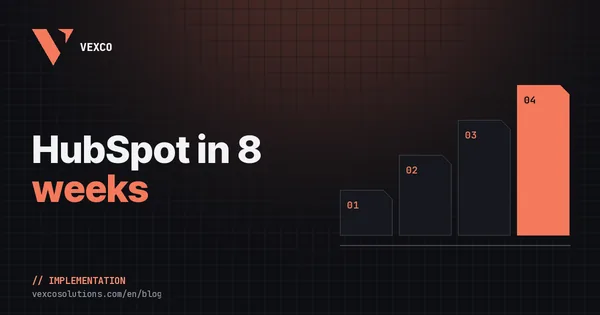
Timeline and cost go hand in hand because most of the budget is a senior team's time. As a reference, a Sales Hub or Marketing Hub implementation usually takes between 4 and 8 weeks, and projects with large migrations or several integrations, 10 to 14.
- Weeks 1-2Audit and scope
- Weeks 3-4Architecture and data model
- Weeks 5-7Configuration, migration and integrations
- Week 8Training and go-live
You will find this plan broken down week by week in how to implement HubSpot in 8 weeks.
On your own, with HubSpot onboarding or with a partner?
There are three routes and none of them is right for everyone. Doing it yourself makes sense with Starter, a small team and someone in-house with time and good judgement: HubSpot Academy and the official knowledge base are good and free. The risk lies in the design, not the clicks: duplicate properties, pipelines that do not reflect how you sell and automations nobody understands six months later.
HubSpot's onboarding guides you through configuring the tool using general best practice. It works well when your process is standard and there are no complex migrations or integrations with other systems.
A partner brings what is left out: adapting HubSpot to your real process, migrating data safely and building the integrations with your ERP, your invoicing or your shop. If you choose one, ask who does each part. Having consultancy and development in the same team means the person who understood your process does not have to explain it to another company that writes the integration.
The cost nobody budgets for: your team
No partner can define your sales process without you. Allow for leadership hours to decide stages and criteria, hours from each team lead to validate properties and automations, and time from key users to test with real data. If nobody in-house has that time, the project takes longer and, as a knock-on effect, costs more.
How to get comparable quotes
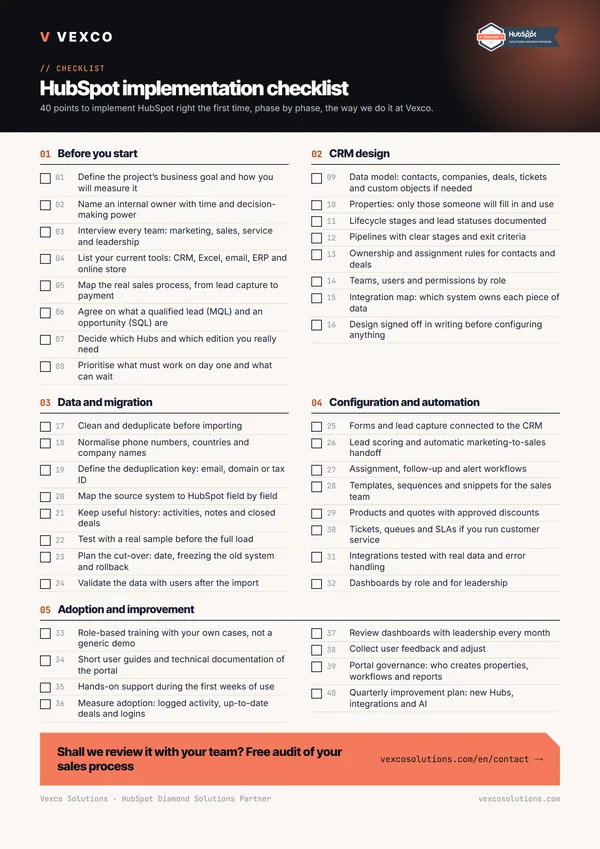
- Describe the process, not the tool: how a lead comes in, who works it, when it is invoiced and what happens afterwards.
- List the systems that need to talk to HubSpot and in which direction: ERP, invoicing, payments, shop, product, support.
- Give rough data volumes: contacts, companies, deals, invoices and the history you want to keep.
- Ask for the scope in phases, with deliverables and acceptance criteria for each one.
- Ask what is not included: HubSpot onboarding, migration, training, documentation and support after go-live.
At Vexco we work with fixed-scope projects in phases and optional monthly support, precisely so you know from the start what you are paying for and what you get. What makes an implementation expensive is not any single line item, but having to redo it two years later.